Connect with us




Discover how accounting firms can adopt AI safely by strengthening client data security, governance and trust from the outset.
By Daniel Stachowiak, Founder and MD, MyDocSafe
Most conversations about AI in accounting start with what the tools can do. Draft the client email. Summarise the bank statements. Spot the anomaly in the ledger. Fair enough – that is where the excitement is.
The harder question is what the tools touch. In an accounting practice, the honest answer is almost everything that matters: bank statements, payslips, passports, tax returns, management accounts, shareholder details. AI is only useful because of that data. Which means the governance question does not start when you switch on an AI tool. It starts at the moment client data enters your firm.
Before any AI is involved, ask a simple question: how does client data get into your firm today? For many practices the truthful answer is "every way possible". Email attachments. Photos sent over WhatsApp. A link to someone's personal Dropbox. A USB stick handed over at the year-end meeting.
Each of those channels is a copy of sensitive data sitting somewhere you do not fully control, with no reliable record of who has seen it. Now add AI. A team member under deadline pressure copies a client's bank statement out of their inbox and pastes it into a free chatbot to "just tidy up the categories". Nobody intended harm. But the firm has just shared client data with a third party, with no contract, no record and no idea where it will be stored or whether it will be used to train a model.
That is the real AI risk for most firms. Not a dramatic failure, but quiet, untracked leakage – and the weaker your client data handling is today, the faster AI amplifies it.
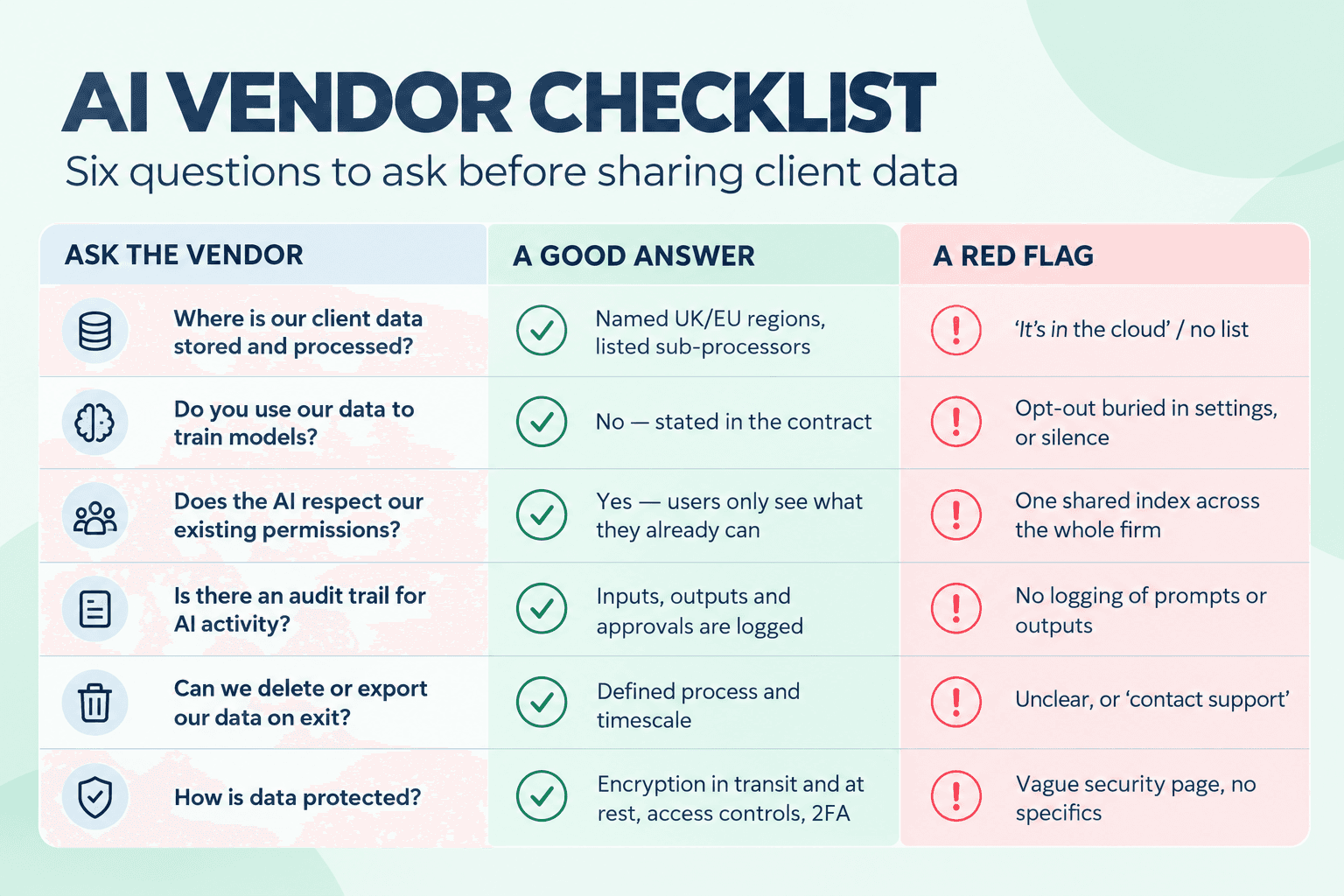
You do not need a 40-page policy to adopt AI responsibly. You do need clear answers to five questions.
1. Where does the data go? For every AI tool, know where client data is processed and stored, which sub-processors are involved, and whether the vendor uses your data to train its models. "In the cloud" is not an answer. UK or EU data residency, a signed data processing agreement and a clear "we do not train on your data" commitment are the minimum.
2. Who can see what? An AI assistant should never see more than the person asking it. If a junior bookkeeper cannot open a client's payroll file, an AI tool they use should not be able to surface it either. Permissions you have set up carefully in your systems are worthless if an AI layer sits above them and ignores them.
3. Can you prove what happened? When something goes wrong – or a client simply asks – you need to show who uploaded a document, who viewed it, who approved the output and when. That applies to AI-generated work too: what was produced, from which inputs, and who signed it off. If you cannot reconstruct the trail, you cannot defend the work.
4. Who is accountable for the output? AI drafts; professionals decide. Your professional obligations do not transfer to a software vendor, and neither does your client's trust. Decide which tasks always need human review before anything leaves the firm – advice, filings, anything with a number a client will rely on – and write that rule down.
5. What do your clients know? Clients are entitled to understand how their information is used. Review your engagement letters and privacy notice so they reflect any AI use. Under UK GDPR, people have specific rights where significant decisions are made about them solely by automated means, and processing that is likely to be high-risk calls for a data protection impact assessment. Being open about AI use is not just compliance – it is how you keep the trust that your client relationships run on.
Here is the part that rarely makes the headlines. The firms best placed to benefit from AI are not necessarily the ones with the most advanced tools. They are the ones that already collect client information in a structured, secure and consented way.
When documents arrive through a secure portal rather than an inbox, when information is gathered through forms rather than free-text emails, when engagement letters are signed electronically with a full audit trail, three things happen. The data is cleaner, so AI output is more reliable. Access is already controlled, so the "who can see what" question is largely answered. And there is a record of every step, so you can prove what happened.
In other words, the unglamorous work of fixing your client front door – onboarding, document collection, signatures, permissions – is not a distraction from AI adoption. It is the precondition for it.
Week 1 – Map it. List how client data enters, moves through and leaves the firm. Then ask the team, without blame, which AI tools they are already using. You will almost certainly find some.
Week 2 – Write one page. An AI use policy that fits on a page: approved tools, data that must never go into them, and which outputs need human review. Short enough that people actually read it.
Week 3 – Test one use case. Pick something low-risk and high-volume – drafting chaser emails, summarising internal meeting notes, first-pass categorisation on test data. Run it alongside your normal process and compare.
Week 4 – Close the loop. Update engagement letters and your privacy notice, decide whether to roll out or stop, and set a date to review. Then pick the next use case.
Thirty days will not transform your practice. It will move you from scattered, invisible experimentation to deliberate adoption that you can explain to a client, a regulator or your own partners.
AI will change the work accountants do – much of the routine processing will shrink, and the time freed up will go into advice and relationships. But clients will not hand over more of their financial lives to a firm they do not trust with the basics. Follow the client data, get the front door right, and AI becomes something you can adopt with confidence rather than something that happens to you.
About the author Daniel Stachowiak is the founder and managing director of MyDocSafe, the client onboarding platform that combines secure client portals, e-signatures and workflow automation for accounting and professional services firms. He founded the company in 2013 to make it simpler and safer for firms to collect, share and sign client documents online.
Latest news, events, and updates on all things App related, plus useful advice on App advisory - so you know you are ahead of the game.